


How to Activate Windows 10
Download link: https://www.microsoft.com/en-us/software-download/windows10
In order to install the software on your PC, please follow the instructions here.
In case of an issue with activating your Windows key, please use one of the methods:
Method 1:
After Windows installation
1. Go to "Settings''
2. Select "Update & Security"
3. Find "Activation"
4. Select "Activate" or "Change Product Key"
5. Enter your windows product key
Method 2:
1. Click on ”Start” icon , then open ”Settings”, choose ”Update & security”, and then select ”Activation”.
2. Choose the ”Activate by phone” option.

3. Click the drop-down menu, select your country, and then click ”Next”
4. Call the Toll free number and follow instructions to generate confirmation ID to activate your Windows.
Method 3:
1. Press and hold "Windows" key and press "R" on your keyboard.
2. Type "SLUI 4" in the window that pops up and press enter.

3. Click the drop-down menu, select your country and then click Next.
4. Call the Toll free number and follow instrucions to generate confirmation ID to activate your Windows. 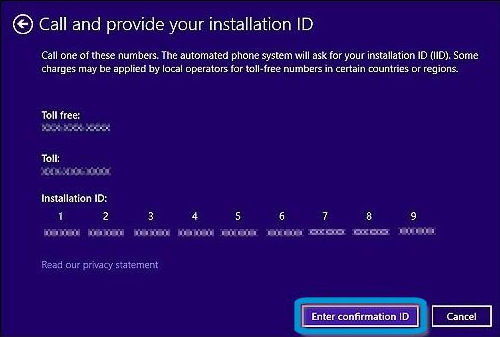 t
t
More information regarding phone activation can be found here.
Compartir